Configuration & Templates
Eloquent Notes provides flexible configuration management, allowing users to customize behavior either visually through a built-in PyQt6 Configuration GUI or directly by editing YAML configuration and Markdown template files.
All configuration data, prompts, and templates are stored in standard user configuration paths under ~/.config/eloquent-notes/.
Built-in PyQt6 Configuration GUI
You can launch the configuration dialog at any time by running:
Alternatively, right-click the Eloquent Notes system tray icon and select Configuration.
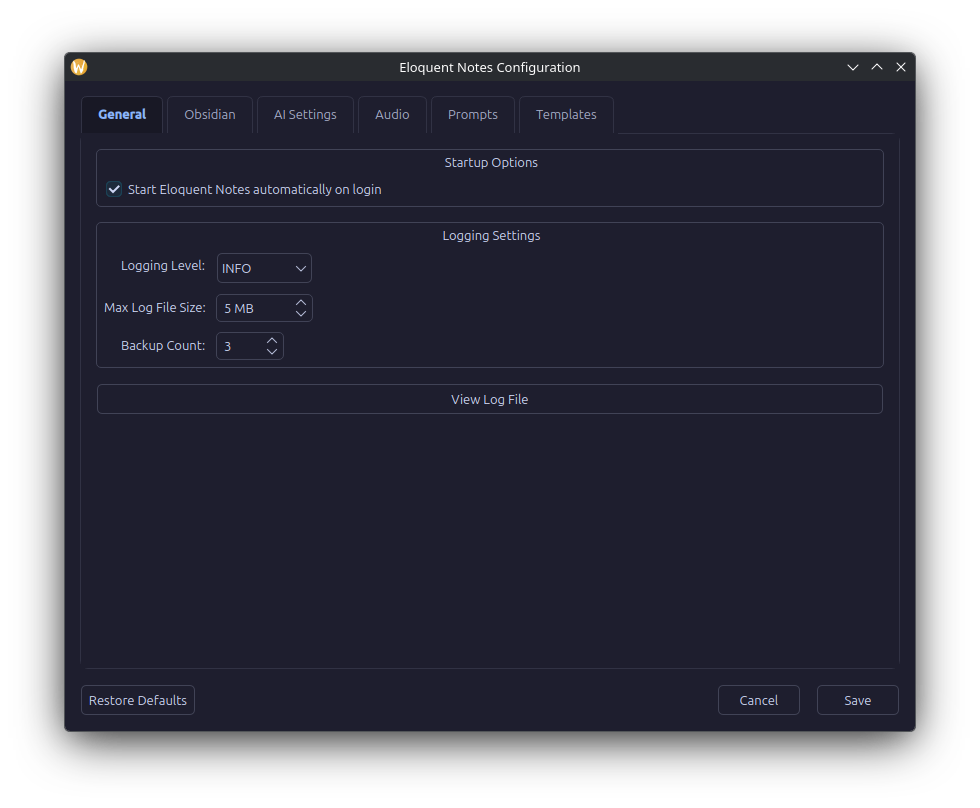
The dialog provides tabbed navigation across six settings panels, along with Restore Defaults, Cancel, and Save action buttons at the bottom.
Tab Breakdown
1. General
Configures runtime application logging behavior:
* Log Level: Verbosity level for system logs (DEBUG, INFO, WARNING, ERROR, CRITICAL).
* Max File Size (MB): Maximum disk storage space dedicated to a single log file before rotation (default: 5 MB).
* Backup Count: Number of historical rotated log archives to preserve in storage (default: 3).
2. Obsidian
Controls how generated dictations are integrated into your Obsidian vault:
* Vault Path: The root path to your Obsidian vault directory (e.g., ~/Obsidian).
* Dictations Subfolder: The subfolder relative to your vault root where standalone notes are stored (default: Dictations).
* Subfolder Structure: Organization strategy for notes inside the target folder (none for directly in target folder, month for YYYY-MM, week for YYYY-Www, or month_week for YYYY-MM/Www).
* Enable Daily Notes: When enabled, dictations classified as daily entries or quick thoughts are automatically routed to your Obsidian Daily Notes folder (YYYY-MM-DD.md).
* Scan Vault Context: Scans existing note titles in your vault and provides them as contextual hints to Gemma 4, allowing the model to automatically insert [[WikiLinks]] when existing topics are mentioned in audio.
3. AI Settings
Configures connection parameters and behavior for the local Ollama inference server:
* Ollama Server URL: Endpoint URL of your running Ollama service (default: http://localhost:11434).
* Model Name: Large language / multimodal model tag (default: gemma4:e4b-it-qat).
* Context Length (num_ctx): Context window limit for LLM requests (default: 8192 tokens).
* Keep-Alive Duration: Time duration to keep model weights loaded in VRAM after note generation (e.g., 0 for immediate unload, 5m, 10m).
* Preload Keep-Alive: VRAM persistence duration while actively recording audio to minimize latency during generation (default: 5m).
* Max Retries: Retry count for JSON schema validation failures during prompt execution (default: 3).
* Preload Timeout: Maximum wait time in seconds for model weights to load into memory (default: 180 seconds).
* Request Timeout: Maximum wait time in seconds for inference generation to complete (default: 300 seconds).
4. Audio
Controls input recording settings, duration limits, and visual/audible status notifications:
* Sample Rate: Recording sample frequency in Hertz (default: 16000 Hz / 16 kHz).
* Channels: Audio channels captured (1 for Mono, 2 for Stereo).
* Capture Duration: Maximum recording duration in seconds before automatically stopping and sending to LLM (default: 30 seconds).
* Show Recording HUD: Displays a floating pill overlay with real-time countdown timer and progress bar while dictating (default: true).
* Enable Audio Feedback: Toggle sound effects played upon starting and stopping recording.
* Beep Frequency: Pitch of the audio tone in Hertz (default: 440 Hz, musical note A4).
* Beep Duration: Length of tone playback in seconds (default: 0.1 seconds).
5. Prompts
Provides a rich text editor for customizing the Markdown prompts that drive each stage of the three-phase AI pipeline: * Transcription System & User Prompts: Direct audio-to-text conversion and noise filtering. * Rewriting System & User Prompts: Structuring raw text into coherent titles and formatted Markdown content. * Classification System & User Prompts: Metadata extraction (note category, tags, and wikilinks). * Retry Prompt: Correction instructions issued when LLM output violates expected JSON formatting.
6. Templates
Allows live editing of the Markdown layout templates used when creating notes in your Obsidian vault.
Manual YAML Configuration Reference (config.yaml)
When initialized, Eloquent Notes creates ~/.config/eloquent-notes/config.yaml. Below is the complete reference schema with default values:
obsidian:
  vault_path: "~/Obsidian"
  folder: "Dictations"
  folder_organization: "none"   # Subfolder structure: "none", "month" (YYYY-MM), "week" (YYYY-Www), "month_week" (YYYY-MM/Www)
  daily_notes: true
  vault_context: true   # Scan vault for existing note names to suggest as wikilinks


ai:
  ollama_url: "http://localhost:11434"
  model: "gemma4:e4b-it-qat"
  context_length: 8192  # Context window size in tokens
  keep_alive: "0"       # VRAM retention after note completion ("0" unloads immediately)
  preload_keep_alive: "5m" # VRAM retention during active recording
  max_retries: 3        # Retries on JSON parsing failure
  preload_timeout: 180  # Seconds allowed for model load
  request_timeout: 300  # Seconds allowed for request inference

audio:
  sample_rate: 16000
  channels: 1
  capture_duration: 30  # Maximum audio capture duration in seconds
  recording_hud_enabled: true # Floating countdown HUD overlay during recording
  beep_frequency: 440
  beep_duration: 0.1
  beep_enabled: true

logging:
  level: "INFO"
  max_mb: 5
  backup_count: 3
Custom Markdown Prompts
System and user prompts reside in ~/.config/eloquent-notes/prompts/:
| File Name | Purpose | Key Variables / Notes |
|---|---|---|
transcription_system.md |
System instructions for audio transcription phase. | Sets multi-modal audio processing behavior. |
transcription_user.md |
User prompt accompanying audio input. | Instructs model to extract speech verbatim. |
rewriting_system.md |
System instructions for note rewriting phase. | Defines tone, formatting, and heading structure. |
rewriting_user.md |
User prompt for note rewriting phase. | Accepts {transcription} variable. |
classification_system.md |
System instructions for note classification phase. | Rules for metadata extraction and JSON output. |
classification_user.md |
User prompt for classification phase. | Accepts {transcription} and {vault_context} variables. |
retry_prompt.md |
Correction prompt on invalid JSON responses. | Forces model to output strict JSON schema. |
Custom Markdown Templates
Note formatting templates reside in ~/.config/eloquent-notes/templates/:
1. standalone.md
Used when creating individual standalone notes inside your configured folder:
2. daily_new.md
Used when creating a new Daily Note for the current day:
---
date: {date}
tags:
  - daily-notes
---

# Daily Note - {date}

## Dictations

### {time} - {title}
{text}
3. daily_append.md
Appended to an existing Daily Note when additional dictations are recorded on the same day:
Available Template Placeholders
| Placeholder | Description | Example Output |
|---|---|---|
{title} |
Title generated by Phase 2 (Rewriting) | Project Architecture Review |
{text} |
Clean, structured Markdown content body | Main note paragraphs and bullet lists |
{tags} |
Indented YAML tag array generated by Phase 3 | - architecture- meeting |
{date} |
Current local date | 2026-08-06 |
{time} |
Current local time stamp | 14:30:15 |