Configuration, Models & Localization
SemSearch can be configured visually through its 5-Step Onboarding Wizard on first launch, at any time via the 4-Tab Settings Dialog (semsearch --settings), or by editing ~/.config/semsearch/config.json.
1. Five-Step First-Run Onboarding Wizard (gui/onboarding.py)
When onboarded is false in config.json, launching SemSearch opens OnboardingWizard:
- Welcome: Overview of SemSearch's local multimodal architecture and 100% offline privacy guarantee.
- Select Folders to Index: Quick checkboxes for
~/Documents,~/Pictures,~/Desktop, and~/Downloads, plus custom folder selection and an initial crawl time estimator. - Multimodal Embedding Model: Configure your Ollama host URL (
http://localhost:11434), click Test Connection to discover installed multimodal models, and select your preferred model (embeddinggemma-2by default). - Developer & Code Search: Optional toggle to enable
code.sqlite, pick code root directories, and choose your preferred IDE (Auto-detect,VS Code,Cursor,Zed,Sublime Text, orJetBrains). - Ready to Search: Summary of your global shortcut (Ctrl+Shift+Space) and background indexing launch.
2. Four-Tab Settings Dialog (gui/settings.py)
Open Settings from the system tray menu or via semsearch --settings:
Tab 1: Folders
- Indexed Folders: Add or remove directories monitored and indexed into
index.sqlite. - Exclusions:
- Skipped Folders: Comma-separated directory names or paths (e.g.,
node_modules, .venv, target). - Skipped Extensions: Comma-separated file extensions excluded from general indexing (default:
heic). - Power & Indexing Schedule:
- Index while on battery power: Toggle whether
PowerSchedulerpauses indexing when/sys/class/power_supplyreports battery discharging. - Limit indexing to hours: Restrict heavy background indexing to a specific
HH:mmtime window (supports overnight ranges such as22:00to07:00).
Tab 2: Code
- Enable Source Code Search: Enables the dedicated
~/.local/share/semsearch/code.sqlitedatabase andcode:query routing. - Code Root Directories: Add or remove root directories containing your software repositories.
- Preferred Code Editor: Choose
Auto-detect,VS Code(code),Cursor(cursor),Zed(zed),Sublime Text(subl), orJetBrains(jetbrains).
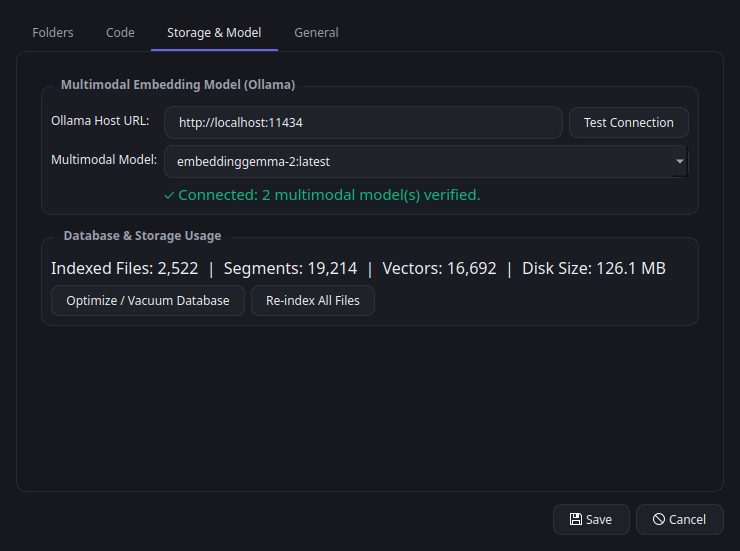
Tab 3: Storage & Model
- Multimodal Embedding Model (Ollama):
- Ollama Host URL: Local or LAN Ollama endpoint (default:
http://localhost:11434). - Test Connection: Queries
/api/tagsand/api/showto filter the dropdown strictly to verified multimodal embedding models. - Multimodal Model: Select the active embedding model (default:
embeddinggemma-2). - Context Window (
num_ctx): Custom token context window passed in/api/embed"options": {"num_ctx": ...}(0automatically queries/api/showand uses the model's maximum supportedcontext_lengthreported by Ollama). Validated against the model's maximum capacity before saving. - Database & Storage Usage:
- Displays live metrics across
index.sqliteandcode.sqlite: Indexed Files, Segments, Vectors, and total Disk Size. - Optimize / Vacuum Database: Runs
VACUUMon both SQLite databases to reclaim disk space. - Re-index All Files: Triggers an immediate crawl and synchronization pass.
Tab 4: General
- Global Shortcut: Configure the desktop-wide hotkey for toggling the Quick Search Panel (default:
ctrl+shift+space). - Interface Language: Choose
Auto-detect(followsLC_ALL/LC_MESSAGES/LANGUAGE/LANG) or explicitly select any of the 23 supported languages. Changes take effect immediately across all UI surfaces (retranslate_ui()). - System Startup: Toggle "Start SemSearch automatically on desktop login" to manage
~/.config/autostart/semsearch.desktop(automatically resolves the fullsemsearchexecutable path forExec=<path> --daemon).
3. Verified Multimodal Model Discovery (core/ollama.py)
When OllamaClient.is_multimodal() evaluates models installed on your Ollama server, it inspects both /api/tags and /api/show:
- Capability Exclusion: Models reporting
"completion"incapabilitieswithout"embedding"are rejected as generative chat-only models. - Multimodal Capabilities: Models reporting
"vision"or"audio"capabilities are accepted. - Architecture & Projector Inspection: Inspects
details.families,details.family, andmodel_infokeys (general.architecture,clip.*,mllama.*,vision.*,audio.*,*projector*) against known multimodal architectures (clip,mllama,gemma-embedding2,embeddinggemma,vision,audio,llava,bakllava). - Automatic Model Change Re-indexing: If you switch to a different embedding model in Settings,
IndexServicedetects the mismatch againstdb.get_meta("model"), clears stale segment vectors (reset_all_for_reindex()), and re-embeds your index with the new model.
4. JSON Configuration Reference (config.json)
Configuration is persisted at ~/.config/semsearch/config.json:
{
  "folders": [
    "/home/username/Documents",
    "/home/username/Pictures"
  ],
  "excluded_folders": [],
  "excluded_types": [
    "heic"
  ],
  "code_enabled": true,
  "code_folders": [
    "/home/username/Develop"
  ],
  "code_editor": "auto",
  "ollama_url": "http://localhost:11434",
  "model": "embeddinggemma-2",
  "num_ctx": 0,
  "hotkey": "ctrl+shift+space",
  "language": "auto",
  "index_on_battery": true,
  "index_schedule_enabled": false,
  "index_schedule_start": 1320,
  "index_schedule_end": 420,
  "onboarded": true
}
| Field | Type | Default | Description |
|---|---|---|---|
folders |
list[str] |
[] |
General directories indexed into index.sqlite. |
excluded_folders |
list[str] |
[] |
Folder names or paths skipped during crawling and watching. |
excluded_types |
list[str] |
["heic"] |
File extensions skipped in general mode. |
code_enabled |
bool |
false |
Enables source code indexing in code.sqlite. |
code_folders |
list[str] |
[] |
Root directories scanned for source code repositories. |
code_editor |
str |
"auto" |
Editor used for line-level code jumps (auto, code, cursor, zed, subl, jetbrains). |
ollama_url |
str |
"http://localhost:11434" |
Base URL of the Ollama server. |
model |
str |
"embeddinggemma-2" |
Multimodal embedding model tag. |
num_ctx |
int |
0 |
Custom token context window (0 auto-detects model's max context_length). |
hotkey |
str |
"ctrl+shift+space" |
Global keyboard shortcut combination. |
language |
str |
"auto" |
UI language code (auto or ISO 639-1 code). |
index_on_battery |
bool |
true |
Allow indexing while laptop battery is discharging. |
index_schedule_enabled |
bool |
false |
Restrict indexing to [index_schedule_start, index_schedule_end). |
index_schedule_start |
int |
1320 (22:00) |
Start time in minutes from midnight (0–1439). |
index_schedule_end |
int |
420 (07:00) |
End time in minutes from midnight (0–1439). |
onboarded |
bool |
false |
Whether the initial onboarding wizard has been completed. |
5. Internationalization (23 Languages & RTL)
SemSearch includes built-in translation catalogs (semsearch.i18n) for 23 languages:
| Code | Language | Code | Language | Code | Language |
|---|---|---|---|---|---|
en |
English | ar |
العربية (RTL) | ms |
Bahasa Melayu |
es |
Español | tr |
Türkçe | tl |
Tagalog (fil) |
fr |
Français | fa |
فارسی (RTL) | ru |
Русский |
de |
Deutsch | he |
עברית (RTL) | uk |
Українська |
it |
Italiano | id |
Bahasa Indonesia (in) |
be |
Беларуская |
pt |
Português | vi |
Tiếng Việt | bg |
Български |
nl |
Nederlands | th |
ไทย | sr |
Српски |
pl |
Polski | kk |
Қазақша |
When an RTL language (ar, fa, he) is active, SemSearchApp automatically sets Qt.LayoutDirection.RightToLeft across the entire application.