User Interfaces
Cud provides three complementary interface modalities designed for different operational workflows: a flexible Command Line Interface (CLI) for scripting and system administration, an interactive Terminal User Interface (TUI) for fast local agent interaction, and a full-featured Desktop Graphical User Interface (GUI) for visual management.
💻 1. Command Line Interface (CLI)
The cud binary provides a unified command line tool powered by Python's argparse and styled with rich.
Command Reference
| Top-Level Command | Description | Example Usage |
|---|---|---|
cud agent |
Manage agent scaffolding, settings, and deletion | cud agent create researcher |
cud gateway |
Configure credentials, run gateways, and manage systemd services | cud gateway start researcher |
cud task |
Discover and inspect scheduled periodic tasks | cud task list researcher |
cud mcp |
Add and inspect Model Context Protocol (MCP) server connections | cud mcp list researcher |
cud tools |
Install custom SKILL.md packages into agent workspaces |
cud tools install researcher ./my-skill |
cud engine |
Monitor local Ollama daemon status and pull models | cud engine pull gemma4:e4b |
cud tui |
Launch an interactive REPL terminal session with an agent | cud tui researcher |
cud completion |
Generate shell autocompletion scripts for Bash or Zsh | cud completion zsh |
Detailed CLI Command Breakdown
Agent Management (cud agent)
cud agent create <name> [--template default]: Scaffold a new agent under~/.cud/agents/<name>/.cud agent list [-v | --verbose]: Display installed agents in a formatted ASCII table with path and model details.cud agent config <name> [--model MODEL] [--context-window INT] [--temperature FLOAT] [--allow-traversal/--no-traversal]: Updatesettings.yamlnon-interactively.cud agent memory <name> [--view] [--clear] [--search QUERY]: Inspect long-term memory (MEMORY.md), clear it, or search past episodic conversation sessions inhistory.db.cud agent delete <name> --yes: Stop active systemd services, remove unit files, and delete the agent directory.
Gateway & Services (cud gateway)
cud gateway setup <agent> discord --token <TOKEN>: Store gateway platform credentials intosettings.yaml.cud gateway run <agent> [--verbose]: Run the gateway daemon in the foreground (useful for debugging).cud gateway start <agent>: Install systemd user unit, reload daemon, and enable service execution.cud gateway stop <agent>: Stop active systemd user service for the agent.cud gateway status <agent>: Query systemd service status and tail recent journal logs viajournalctl.
Model Context Protocol (cud mcp)
cud mcp add <agent> <url_or_cmd> [--name NAME] [--transport stdio|sse|streamable_http] [--env KEY=VAL]: Add stdio or SSE MCP servers tomcp.json.cud mcp list <agent>: Output raw JSON configuration of configured MCP servers and tool filter rules.
Tool & Skill Installation (cud tools)
cud tools install <agent> <path_or_url>: Fetch a remote skill via HTTP/HTTPS or copy a local skill directory into~/.cud/agents/<name>/workspace/skills/.
Ollama Engine Helper (cud engine)
cud engine status [--base-url http://localhost:11434]: Verify connection to Ollama and list installed local models.cud engine pull <model_name>: Executeollama pullsubprocess to download models.
Shell Completion (cud completion)
cud completion bash: Output completion specification for Bash shell.cud completion zsh: Output_argumentscompletion function for Zsh.
🖥️ 2. Terminal User Interface (TUI)
Launch an interactive terminal REPL using:
Built using Rich and prompt_toolkit, the TUI provides a rich console chat experience with syntax-highlighted Markdown rendering, tool execution feedback, session thread persistence, and prompt history navigation.
- Prompt History Navigation: Previous user prompts across sessions are dynamically indexed from
history.db. Press the↑(Up) and↓(Down) arrow keys to cycle through your previous prompts. - Autocompletion: Tab autocompletion is available for slash commands and subcommands.
Built-in TUI Slash Commands
/help— Display available TUI commands and usage instructions./clear— Clear the current terminal screen buffer./undo— Revert the last user message and assistant tool exchange from thread state./reload— Hot-reload system prompt (AGENT.md), settings, and MCP tools without restarting TUI./memory— Inspect (/memory view), clear (/memory clear), or search past episodic sessions (/memory search <query>)./quitor/exit— Exit the TUI session cleanly.
🎨 3. Desktop Graphical User Interface (GUI)
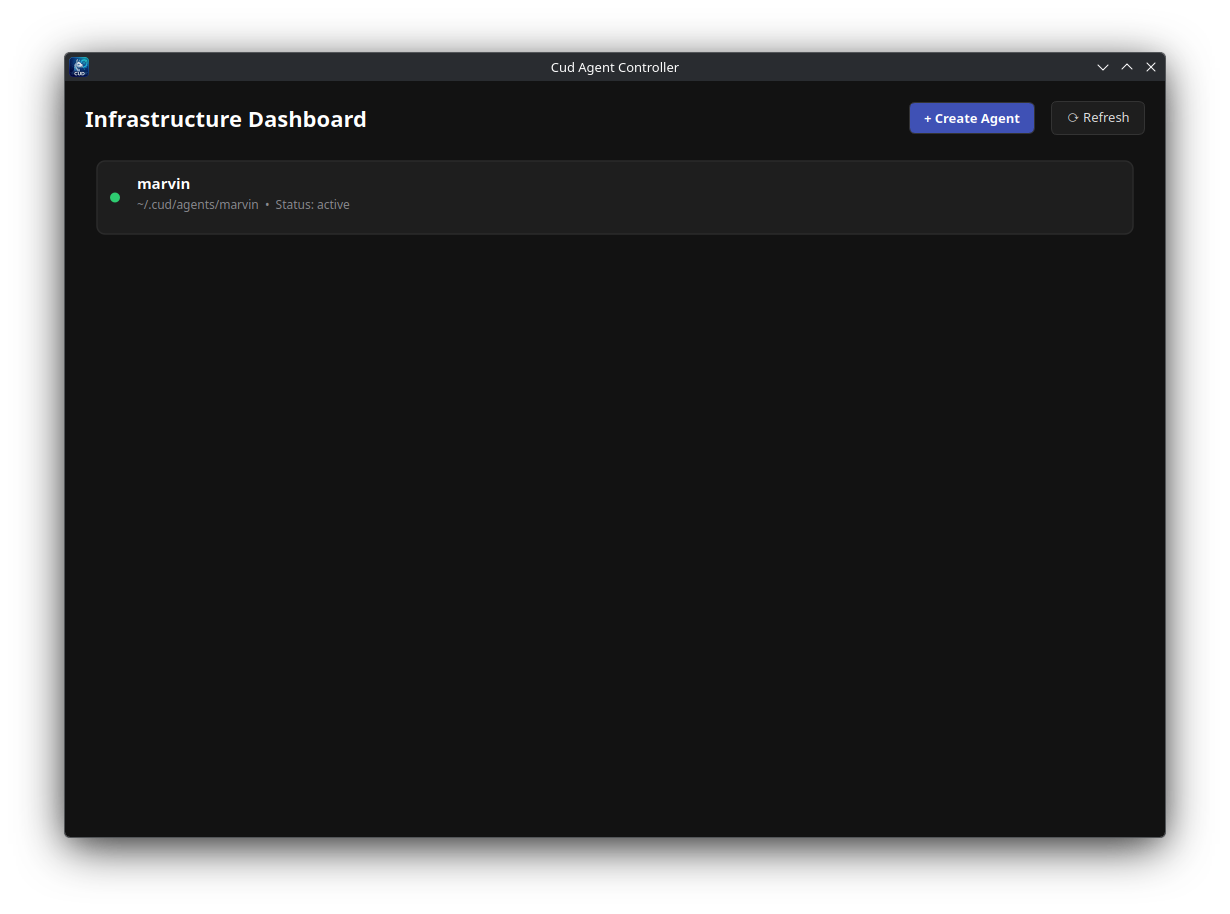
Cud includes a standalone desktop application built with PySide6 and Qt6:
Key GUI Features & Modules
- Dashboard & Inventory View:
- Visual card list of all created agents.
- Live status indicators showing systemd service state (
active,inactive,failed). -
Quick action controls to start, stop, or open TUI sessions directly.
-
Agent Configuration Panel:
- Interactive forms to adjust model providers, model names, temperature sliders, and context token windows.
-
Toggle runtime boundary controls (virtual sandbox vs system directory traversal).
-
Markdown Prompt & Memory Editor:
- Integrated tabbed text editor with syntax highlighting for
AGENT.mdsystem prompts. -
Dedicated memory inspection and editing view for
/agent/MEMORY.md. -
Task & MCP Server Manager:
- Monitor scheduled
TASK.mdcron jobs and inspect next execution timestamps. - Manage connected MCP servers, env vars, and allowed tool filters through a GUI table.