Built-in Tools & Portable Skills
Cud provides a powerful execution environment by pairing core system capabilities (shell execution, filesystem operations, and context management) with modular, portable skills that follow progressive disclosure patterns.
Built-in Tools
Every Cud agent comes equipped out of the box with standard runtime tools powered by the deepagents execution framework and backend composition.
1. Shell Session Execution
Agents execute commands via the LocalShellBackend.
* Execution Boundary: By default, shell commands are confined to the agent's workspace/ folder (virtual_mode=true). If runtime.allow_traversal is set to true in settings.yaml, directory traversal outside workspace/ is permitted.
* Stateful Sessions: Shell sessions persist working state across sequential commands within an interaction.
2. Filesystem Operations
Built-in filesystem tools allow agents to manage project files directly: * Read: Retrieve raw content or line ranges from text files. * Write: Create new files or overwrite existing ones. * Replace: Replace specific string blocks or ranges inside files cleanly without full file rewrites. * List Directory: Inspect directory trees, subdirectories, and file metadata.
Filesystem access is routed through a CompositeBackend, mapping default paths to workspace/ while routing system level memory and agent configurations through /agent/ virtual routes.
3. Context Compression Tool (compact_conversation)
To maintain high reasoning accuracy over extended chat threads without exceeding Ollama context windows, Cud includes the compact_conversation tool via deepagents summarization middleware.
* Function: Summarizes prior interaction exchanges, distilling conversation history into core facts, goals, and results.
* Triggering: The tool can be invoked explicitly by the LLM when context bounds fill, or automatically executed by summarization middleware.
4. Episodic Memory Recall Tool (search_past_conversations)
Agents are automatically equipped with an episodic memory search tool powered by cud.agent.episodic_memory.
* Function: Searches past conversation sessions in SQLite (history.db) matching user-specified keywords, topics, or dates (e.g., 'yesterday', 'auth', 'database migration').
* Session Excerpts: Returns timestamped excerpts and snippet previews from prior conversations while strictly excluding the active conversation thread.
* Autonomous Recall: When users ask questions referencing earlier tasks or previously solved errors, the LLM autonomously triggers this tool to retrieve the exact solution without requiring manual log searching.
Portable SKILLs
Skills are self-contained, domain-specific instruction bundles that teach agents how to perform specialized workflows (e.g., database administration, API integration, code formatting).
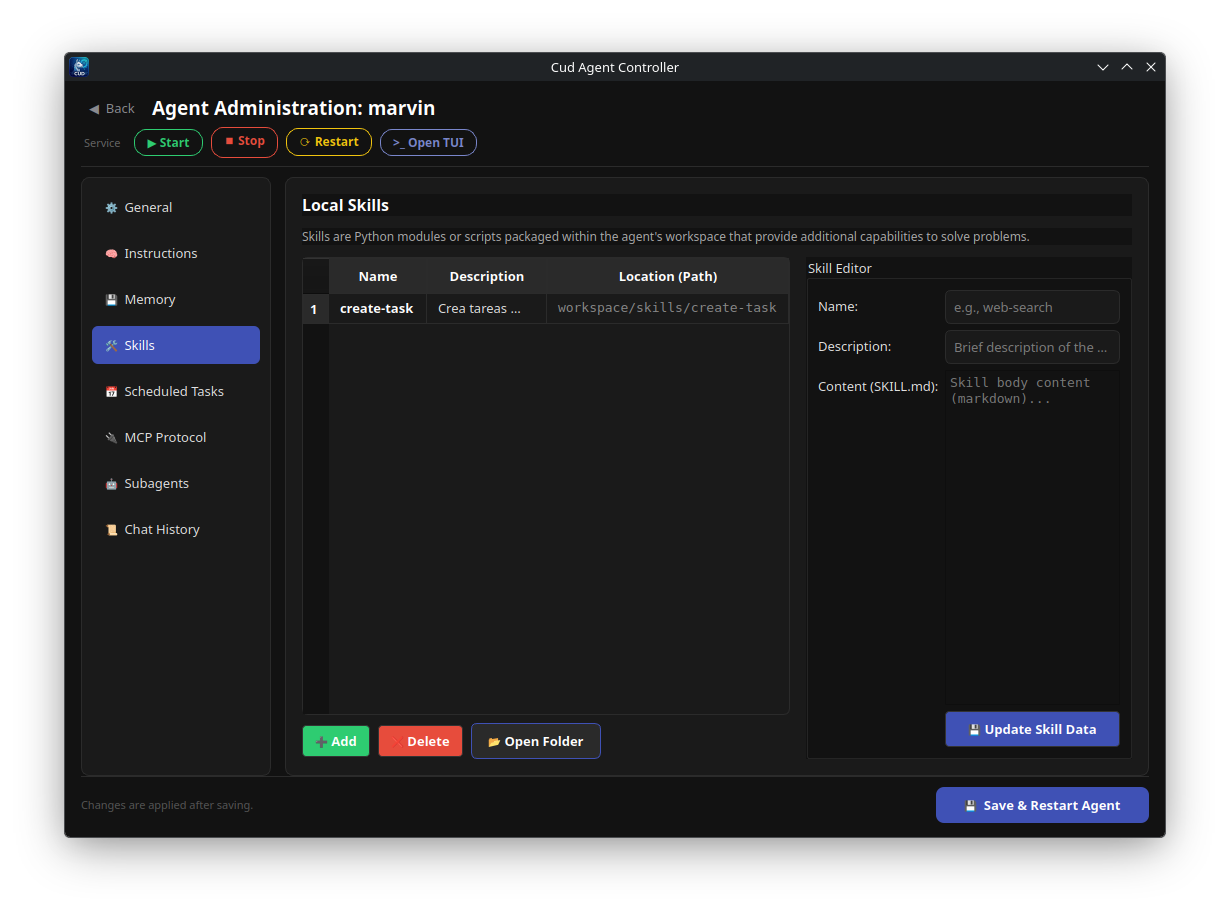
Concept of SKILL.md & Progressive Disclosure
Rather than injecting thousands of tokens of instructions into every system prompt upfront, Cud uses a progressive disclosure pattern:
1. At startup, Cud scans the agent's skills directory and extracts lightweight cards (name and brief description).
2. The agent prompt is injected only with this high-level skill directory index.
3. When the agent determines a task requires a specific skill, it dynamically reads the full SKILL.md file using filesystem tools.
YAML Frontmatter Schema
Each SKILL.md must start with a valid YAML frontmatter header:
---
name: github-automation
description: Guidelines and CLI workflows for managing GitHub pull requests, issues, and releases using gh CLI.
---

# GitHub Automation Skill

Follow these steps when interacting with GitHub repositories...
name: Identifier for the skill. If omitted, defaults to the parent folder name.description: Concise summary of what the skill does and when the agent should read it.
Directory Layout
Skills reside inside the workspace under workspace/skills/:
workspace/skills/
├── github-automation/
│   ├── SKILL.md
│   ├── scripts/
│   │   └── pr_check.sh
│   └── templates/
│       └── release_notes.md
└── sqlite-helper/
    └── SKILL.md
Auto-Discovery & Installation
Cud automatically scans workspace/skills/*/SKILL.md whenever an agent runtime initializes or reloads.
You can install skills into an agent's workspace using the cud tools install CLI command:
# Install a skill from a local folder or file
cud tools install my-agent ./my-custom-skill/

# Install a skill from a remote Markdown URL
cud tools install my-agent https://raw.githubusercontent.com/example/skills/main/docker-build/SKILL.md
Automatic Context Compression & Offloading
As conversations progress over days or weeks, managing token limits is critical. Cud implements a two-stage context reduction strategy:
- Summarization Strategy: When context capacity is reached, the summarization middleware calls
compact_conversation. The LLM synthesizes key context, pending tasks, and decisions into a condensed summary block that replaces old message turns in memory. - History Offloading: Uncompressed raw message histories are offloaded to Markdown logs located in
workspace/conversation_history/<thread_id>.md. This ensures complete auditability and allows agents to re-read long-past thread logs if historical detail is requested later. - Manual Compaction: Users can trigger manual session reset or thread cleanup at any point using gateway commands (
/new,/undo) or by invoking context compaction tools within custom subagent flows.