Model Context Protocol (MCP) Integration
Cud natively integrates with the Model Context Protocol (MCP) via langchain-mcp-adapters, allowing agents to seamlessly connect to external tool providers, database connectors, browser automation servers, and custom microservices.
Overview & Architecture
MCP enables standardized tool discovery and invocation between LLM orchestration engines and external processes or remote HTTP servers. In Cud, MCP tools are dynamically loaded into the agent runtime on startup and cleaned up asynchronously when the agent runtime closes.
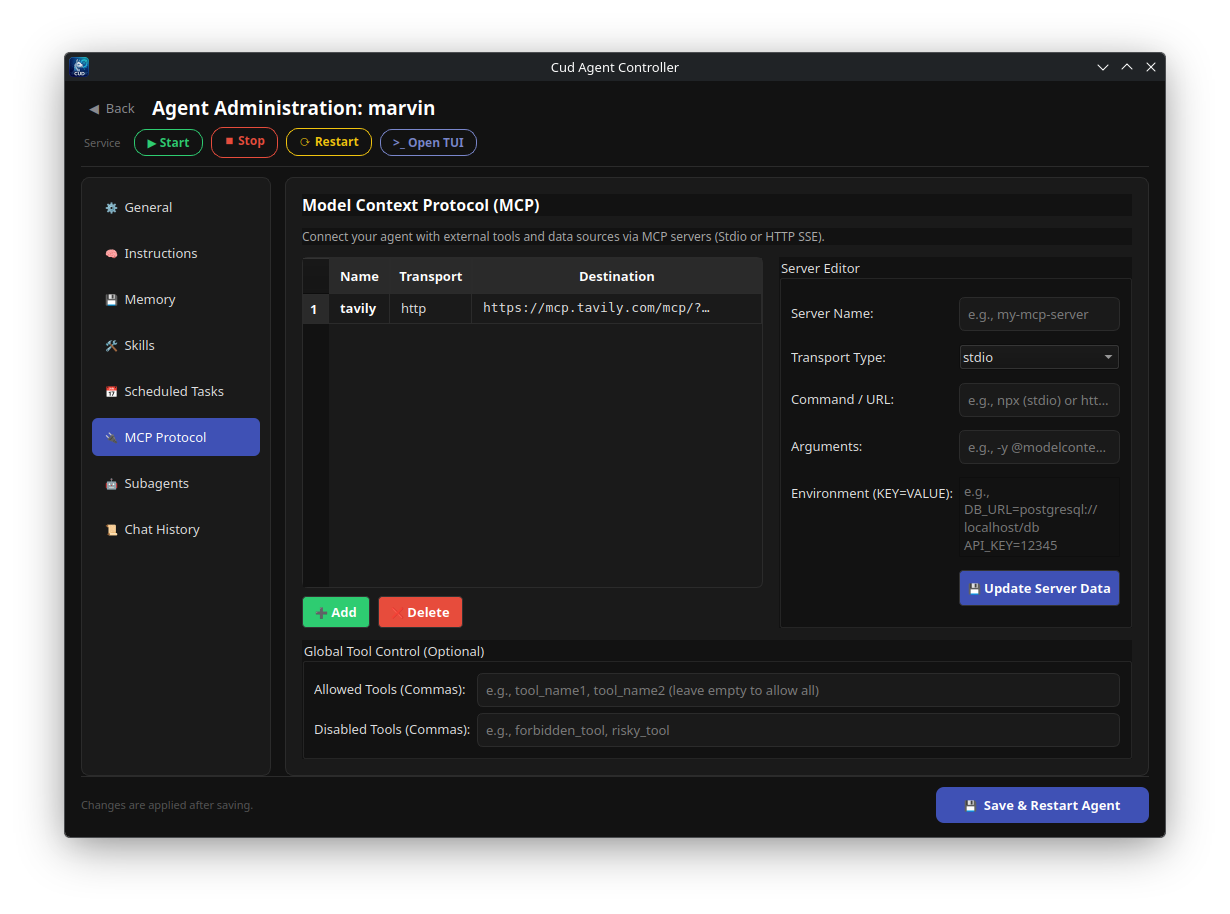
Server Transports & Types
Cud supports all major MCP transport types:
1. Stdio Command Servers
Process-based servers executed locally via command line tools (e.g., npx, uvx, python, docker).
* Communication: Standard Input / Standard Output (stdio).
* Typical Use Cases: Local filesystem access, Git integration, SQLite queries, Playwright automation.
{
  "command": "npx",
  "args": ["-y", "@modelcontextprotocol/server-sqlite", "--db-path", "/path/to/db.sqlite"],
  "transport": "stdio"
}
2. SSE & Streamable HTTP Endpoints
Network-based servers operating over HTTP Server-Sent Events or streamed HTTP protocols.
* Transports: sse or streamable_http.
* Typical Use Cases: Remote API connectors, cloud databases, shared team microservices.
The mcp.json Configuration File
Each agent maintains its own isolated MCP server definitions in mcp.json at the root of the agent's directory (~/.cud/agents/<agent_name>/mcp.json).
File Structure & Schema
{
  "servers": {
    "filesystem": {
      "command": "npx",
      "args": ["-y", "@modelcontextprotocol/server-filesystem", "/home/user/projects"],
      "transport": "stdio"
    },
    "github": {
      "command": "npx",
      "args": ["-y", "@modelcontextprotocol/server-github"],
      "transport": "stdio",
      "env": {
        "GITHUB_PERSONAL_ACCESS_TOKEN": "${GITHUB_TOKEN}"
      }
    },
    "remote-search": {
      "url": "http://localhost:8080/sse",
      "transport": "sse"
    }
  },
  "allowedTools": [
    "read_file",
    "search_repositories",
    "create_issue"
  ],
  "disabledTools": [
    "delete_file"
  ]
}
Key Configuration Options
servers: Map of server aliases to their transport configurations.allowedTools: Optional explicit whitelist of tool names. If specified, only tools matching these names are exposed to the agent.disabledTools: Explicit blacklist of tool names. Any tool listed here is filtered out.
Environment Variable Expansion ${VAR_NAME}
Secrets and API keys should never be hardcoded in mcp.json. Cud supports dynamic environment variable substitution using ${VAR_NAME} syntax:
When loading the server config, Cud scans os.environ for matching keys. If an environment variable is missing, Cud logs a warning and gracefully skips initializing that specific MCP server without breaking the rest of the agent runtime.
Managing MCP Servers via CLI
Cud provides CLI subcommands to inspect and modify mcp.json configurations without manual editing:
Add a Stdio Server
cud mcp add my-agent "npx -y @modelcontextprotocol/server-memory" --name memory --env API_KEY="${MY_KEY}"
Add an SSE Server
Restrict Allowed Tools
cud mcp add my-agent "npx -y @modelcontextprotocol/server-git" --name git --allowed-tool git_status --allowed-tool git_log
List Configured Servers
To view current servers, whitelisted tools, and blacklisted tools:
Removing Servers
To remove an MCP server, edit ~/.cud/agents/<agent_name>/mcp.json directly or clear the server key under the "servers" dictionary, then reload the agent with /reload or cud gateway restart.