Periodic & Scheduled Tasks
Cud features an integrated background job scheduler that allows agents to execute autonomous workflows on recurring cron schedules and publish reports directly to Discord channels or direct messages.
Overview
Scheduled tasks allow Cud agents to operate proactively without requiring real-time human prompts. Examples include daily code repository health checks, weekly news summaries, or hourly service monitoring.
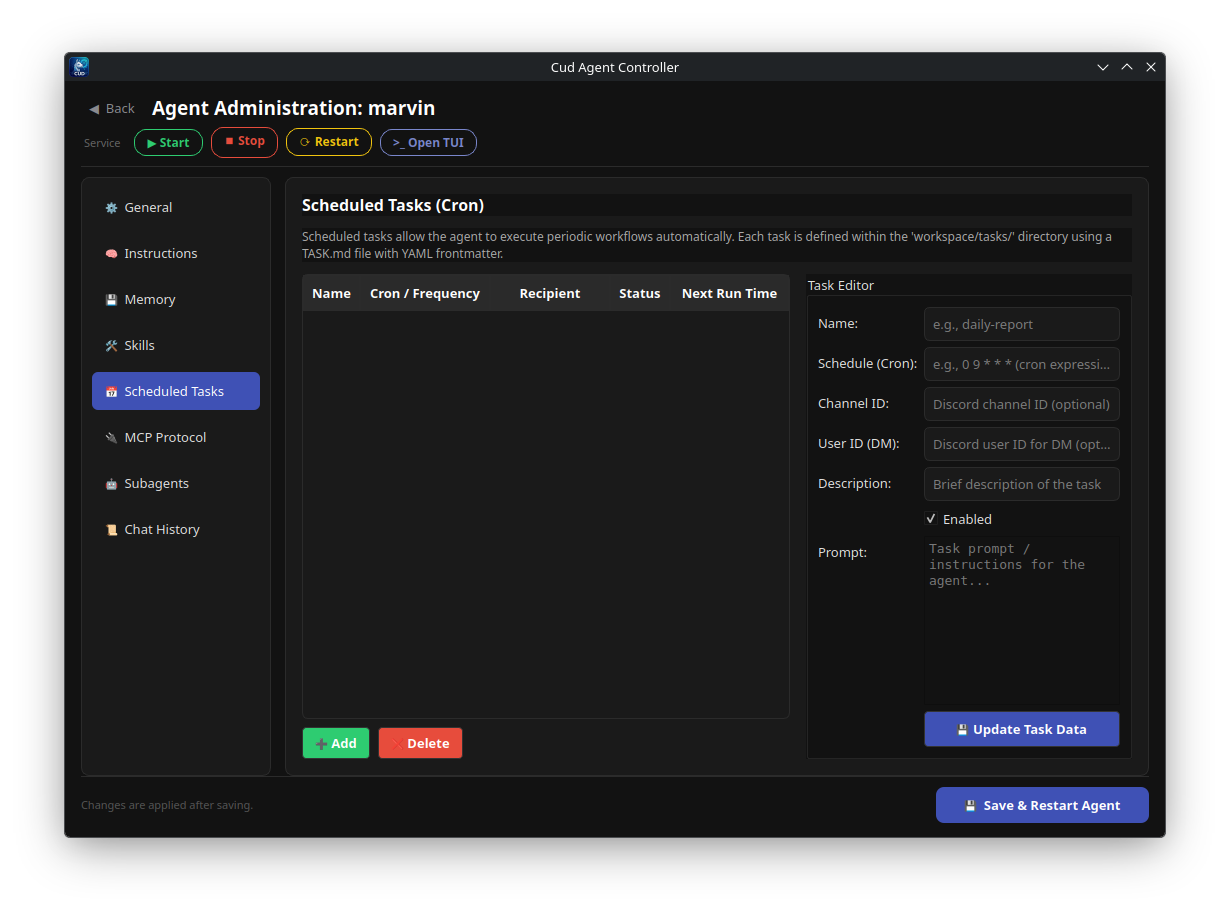
Task Definition Format (TASK.md)
Tasks are defined as Markdown files containing YAML frontmatter and prompt body instructions. Each task is stored in its own subfolder inside the agent's workspace:
workspace/tasks/<task-name>/TASK.md
TASK.md Example
---
name: daily-standup-summary
description: Gathers git commits and ongoing task status to post a daily summary.
schedule: "0 9 * * 1-5"
channel_id: 123456789012345678
enabled: true
---

Inspect the git repository status and summarize the main changes committed over the last 24 hours. Create a structured standup report covering:
1. Key features implemented
2. Bug fixes
3. Open pull requests needing review
Frontmatter Parameters
name(required): Descriptive task name. Defaults to folder name if omitted.schedule(required): Standard 5-field cron expression string parsed viacroniter.channel_id: Target Discord text channel ID where execution output will be delivered.user_id: Alternative Discord user ID for sending execution results via Direct Message (DM).enabled(default: true): Set tofalseto disable task execution without deleting the file.- Prompt Body (required): The Markdown text below the frontmatter serves as the exact user prompt fed to the agent when the task triggers.
Cron Expression Parsing via croniter
Task schedules use standard cron syntax parsed by Python's croniter library:
| Cron Expression | Meaning |
|---|---|
*/15 * * * * |
Every 15 minutes |
0 * * * * |
Every hour on the hour |
0 9 * * 1-5 |
Every weekday (Mon-Fri) at 09:00 AM UTC |
0 0 1 * * |
First day of every month at midnight UTC |
Internal Scheduler Architecture
The task scheduler (TaskScheduler) runs asynchronously inside the Discord gateway event loop:
- Task Discovery: Scans
workspace/tasks/*/TASK.mdat gateway launch and compiles enabledTaskCarditems. - Optimal Sleeping Loop: The scheduler calculates the exact delay until the soonest task execution time using
croniter.get_next(). It then sleeps until that instant without continuous CPU polling. - Dynamic Hot-Reloading: When a user runs
/reloadin Discord or modifies task files, the scheduler immediately wakes up via anasyncio.Eventsignal and recalculates upcoming execution times. - Execution & Isolated Threads: When a task fires:
- A fresh, isolated runtime session thread (
task-<uuid>) is instantiated. - The prompt body from
TASK.mdis invoked. - Agent output is chunked (respecting Discord's 2000 character limit) and sent to the configured
channel_idoruser_id. - The temporary runtime session is cleaned up and closed.
Managing Tasks via CLI
You can inspect all configured scheduled tasks for an agent using the cud task list CLI command:
Example CLI Output Table
┌───────────────────────┬─────────────┬───────────────────────────┬─────────┬──────────────────────┐
│ Name                  │ Schedule    │ Destination               │ Enabled │ Next Run             │
├───────────────────────┼─────────────┼───────────────────────────┼─────────┼──────────────────────┤
│ daily-standup-summary │ 0 9 * * 1-5 │ channel:12345678901234567 │ ✓       │ 2026-08-07 09:00 UTC │
│ hourly-health-check   │ 0 * * * *   │ channel:98765432109876543 │ ✓       │ 2026-08-06 03:00 UTC │
│ weekly-cleanup        │ 0 0 * * 0   │ DM:112233445566778899     │ ✗       │ —                    │
└───────────────────────┴─────────────┴───────────────────────────┴─────────┴──────────────────────┘
The table displays the task name, cron schedule, target destination, enabled status (✓/✗), and next projected UTC execution timestamp.